CAMS Invoice Processing
Reads CAMS invoice PDFs, ignores excluded invoices as configured, prepares DFIS rows, generates AMC-wise GST invoice PDFs and fills the CAMS upload template.

Advisor Tech Hub helps MFDs and mutual fund distributors generate GST invoices, prepare CAMS/KFIN upload Excel files, reconcile bank receipts, create credit notes, and export auditor-ready GSTR-1 Excel and JSON files from a single controlled workflow.
Reads CAMS invoice PDFs, ignores excluded invoices as configured, prepares DFIS rows, generates AMC-wise GST invoice PDFs and fills the CAMS upload template.
Extracts KFIN ZIP/PDF files, parses invoice values, protects against duplicates, generates GST invoices and creates the KFIN-ready upload workbook.
Add P2P lending, Corporate FD, vendor and other non-AMC invoices during the manual insertion stage so they are sorted into the same invoice sequence.
Create AMC credit notes against original invoices, maintain a consolidated credit-note register and include credit-note values in GST export outputs.
Upload Excel or CSV bank statements and compare credits with taxable value, GST value and total invoice receipt amounts from consolidated invoices.
Generate auditor-ready GSTR-1 Excel output and portal-style JSON from invoices and credit notes. B2B invoices go to the GSTR-1 B2B sheet, credit notes go to CDNR, and JSON is mailed with the report package.
Maintain multiple rental offices, unregistered supplier/URP details, SAC 997212, monthly value, invoice day and nature of expense for separate RCM reporting.
Send professional HTML emails with output attachments and keep downloadable files available in Drive for client-side review and archive.
Advisor Tech Hub is a dedicated GST automation platform for MFDs who need monthly AMC invoice processing, CAMS GST invoice automation, KFIN GST invoice automation, RTA upload Excel preparation, GSTR-1 Excel export and GSTR-1 JSON generation.
Upload CAMS PDFs and KFIN ZIP/PDF files, review parsed rows, insert manual invoices where needed, generate invoice PDFs, and prepare upload-ready Excel files.
Export GSTR-1 Excel and JSON files, reconcile bank credits with taxable value and GST value, create credit notes, and keep output files in the user's own Google Drive.
The invoice format supports supplier details, AMC recipient details, SAC code, taxable value, GST split, reverse charge note, seal and sign placement. The sample shown uses masked GST/PAN-style values and sample supplier information.
Open Sample Invoice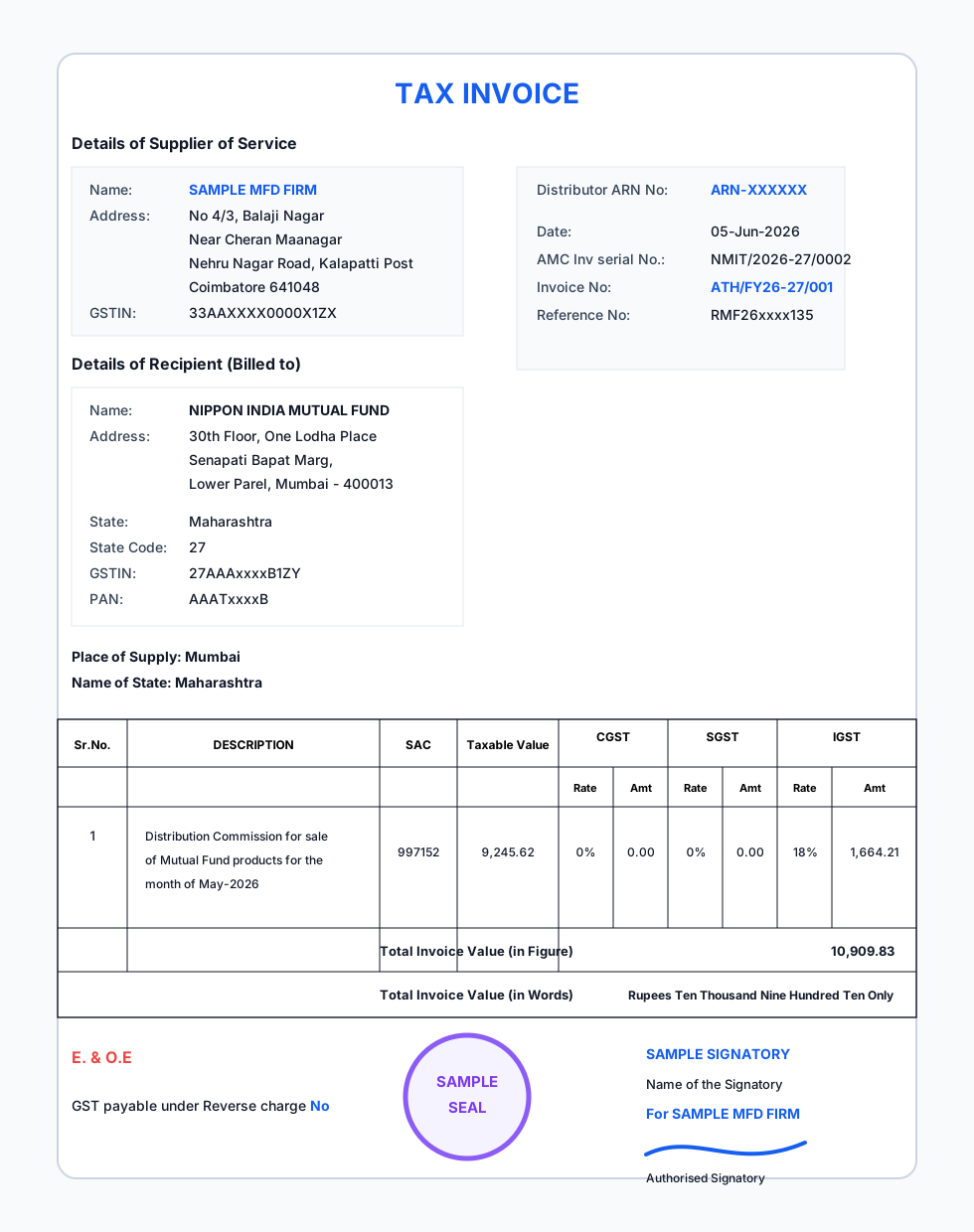
Configure GST details, invoice prefix, Drive folder, working sheet, email recipients, sign and seal.
Upload CAMS PDFs and KFIN ZIP/PDF files. Files are stored inside the user's Google Drive source folders.
Review parsed data, add manual rows, sort by invoice date and generate invoice PDFs in sequence.
Create upload files, mail outputs, reconcile bank credits and export auditor GST reports.
Advisor Tech Hub stores limited account, subscription, settings and operational metadata. Source files, working sheets, generated invoices, GSTR-1 Excel/JSON files, reconciliation reports, consolidated data and output files are intended to stay in the user's own Google Drive and Google Sheets, available for download anytime from that Google account.
The software reduces manual work and helps avoid repetitive errors, but it does not guarantee GST credit, filing acceptance, bank credit matching, tax compliance or audit approval. Users must review outputs before filing or sharing.
Sign in with Google, accept the policies, fill Settings, authorize Drive, create or verify folder structure, create working sheet from the master template, upload source files, and start the complete process.
They are saved inside the Google Drive folders configured by the user. You can open, download, archive or share them from your own Google account.
Upload the CAMS invoice PDFs downloaded from the CAMS distributor mailbox or relevant RTA source. The app reads the AMC name, invoice date, invoice number, taxable value, GST value and required reference details.
Upload the KFIN ZIP or PDF package as downloaded. The app extracts the files, checks duplicates, reads invoice details and prepares the KFIN output file after invoice generation.
Yes. During processing, the app pauses before invoice numbering so manual invoices can be inserted and sorted into the same invoice sequence.
The bank reconciliation report highlights matched receipts, missing taxable values, missing GST values and previous month receipts where available from consolidated data.
Generated files can be mailed, downloaded and archived. DFIS rows move to the consolidated sheet, final files move to consolidated Drive folders, and working/source folders can be cleared for the next month.
Yes. GST Report Exports creates the GSTR-1 Excel file, the matching GSTR-1 JSON file, and a separate Rental RCM Excel file when applicable. These are mailed to configured auditor/report email IDs.
1 invoice-generation run within 20 days.
Best for offices generating fewer than 10 invoices per month, with 120 invoices included for the year.
For regular monthly processing with larger invoice volume.
After one successful monthly cycle, users are prompted to share a Google review. Visitors can open the public review page to read or write Advisor Tech Hub reviews.
Open Google Reviews Page Write a Google Review
Approved Google review highlights will appear here.
The platform is designed to process and store business files inside the user's configured Google Drive and Sheets. Advisor Tech Hub stores only limited metadata needed for login, support, settings and subscription management.
No. It is an automation tool. GST credit, filing accuracy and statutory compliance must be verified by the user and their professional adviser.
In practical usage, a complete month with around 40 to 50 invoices can normally be completed within about 15 to 20 minutes, depending on Google export speed, file size and user review time.
The standard template is controlled centrally. Custom mapping can be enabled for specific users from the admin side when required.
Download CAMS invoice PDFs from the CAMS distributor/RIA service area or the relevant CAMS mailbox process for the selected month. Upload the PDFs in the CAMS upload box without renaming them unnecessarily.
The app can parse CAMS invoice data for internal processing, while export and upload logic can be configured to include only the invoice categories required for RTA upload. The final output should be reviewed before submission.
Upload the KFIN ZIP/PDF package as received for the month. The app extracts the package, reads individual invoice PDFs, updates the live activity log and prepares KFIN upload rows after invoice PDFs are generated.
Open the working Google Sheet, review DFIS rows and correct the row before continuing. This keeps the output controlled and avoids generating invoice PDFs from unchecked data.
Add manual invoices only at the manual insertion stage before invoice numbering. Those rows are sorted with CAMS/KFIN rows, then invoice numbers are generated in sequence.
The reconciliation module is designed for Excel/CSV statements where credit dates, narration and credit amount can be identified. Matching focuses mainly on amount and available consolidated invoice data, with narration used where useful.
The GST export uses the configured GST template and fills sales invoices, manual invoices, credit notes and rental reverse-charge entries where applicable. The file can be mailed to the auditor from the configured email settings.
Google PDF and Excel export can occasionally take more time. The app keeps updating the process state and can resume from the last completed stage instead of forcing the user to restart from the beginning.
Yes. Files are stored in the user's Drive folders. The reports/download area also shows generated files when the process output is available.
Confirm the correct month files are uploaded, Drive authorization is active, the working sheet exists, firm settings are saved, sign/seal images are uploaded, AMC master and vendor master details are current, and email recipients are correct.
Technical support is available only on prior appointment. Text guidance is provided through WhatsApp or email. Remote sessions, when scheduled, are for software guidance only and do not replace accounting, tax, audit, GST filing, or statutory advice.
By signing up, signing in, authorizing Google Drive, starting a trial, or making payment, the user accepts the Terms of Service, Privacy Policy, and Refund Policy. The platform is an automation tool and the user remains responsible for reviewing all outputs before use.